

 OMG Standards
Event Communication
Consumers and Suppliers
Event Service and Type any
Creating and Locating an Event Channel
OMG Standards
Event Communication
Consumers and Suppliers
Event Service and Type any
Creating and Locating an Event Channel
Typically, interactions between a CORBA-based client and server are direct. That is, requests from the client flow directly to the server and responses flow directly back to the client. Sometimes this style of interaction is too rigid. For this style of interaction to work both the client and the server must be available. Also, the client must explicitly select the server with which it wants to communicate. Relaxing these constraints requires a different style of interaction.
The NonStop DOM Event Service provides a facility for decoupling the communication between clients and servers. This facility might be useful in applications with some of the following requirements:
One example of this type of application is a monitoring facility. Objects providing sensor-monitoring capabilities could use an event channel to signal when an alarm condition occurs. Consumers of the event channel could be objects that provide notification to one or more parties who could take corrective action.
The NonStop DOM Event Service is an implementation of the OMG Event Service specification. Only nontyped events are available in this version.
The NonStop DOM Event Service provides one or more event channels that can be used for de-coupled communication. Users of the event channels act in either a consumer role or a supplier role. The event channel acts as an intermediary between consumers and suppliers. The following diagram illustrates the concept:
Figure 1. Diagram Showing a Few Suppliers, the Event Channel, and a Few Consumers
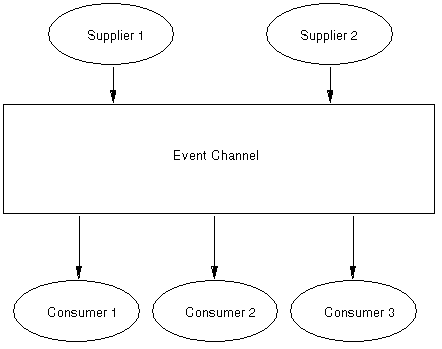
Suppliers produce event data and consumers process event data. Using standard CORBA requests, suppliers send event data into the event channel. The event channel communicates the event data to the consumers, also using standard CORBA requests. These requests can be made using either the Static Invocation Interface (SII) or Dynamic Invocation Interfaces (DII).
Two approaches to event communication are possible: the push model and the pull model. In the push model, a supplier creates an event and sends it into the event channel when it has an event to supply. A consumer receives data when it is available. In the pull model, the consumer requests data at its own pace; the supplier produces event data when required. There are four possible roles for suppliers and consumers: push supplier, push consumer, pull supplier and pull consumer. Which of these roles is used in a particular application depends on which objects initiate the data transfer. Any combination of these roles can be used by different components of an application.
Since the event channel acts as an intermediary, suppliers are unaware of the communication model used by consumers and consumers are unaware of the communication model used by suppliers. So, a push supplier can provide data to a pull consumer and a pull supplier can provide data to a push consumer.
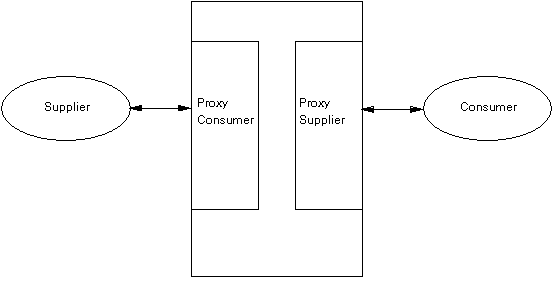
Consumers and suppliers interact with each other indirectly through the event channel. To the consumer, the event channel appears to be an event supplier. To the supplier, the event channel appears to be an event consumer. So the event channel supplies proxy objects to consumers and suppliers. These proxy objects bear the correct interface such that the consumers and suppliers appear to be interacting with each other directly. Figure 2 illustrates the concept:
Figure 2. Diagram Showing the Relationship Among Suppliers, Consumers, and Proxies
This section illustrates the following configurations of consumers and suppliers:
A push supplier, push consumer configuration is illustrated in figure 3.
Figure 3. Push Supplier, Push Consumers
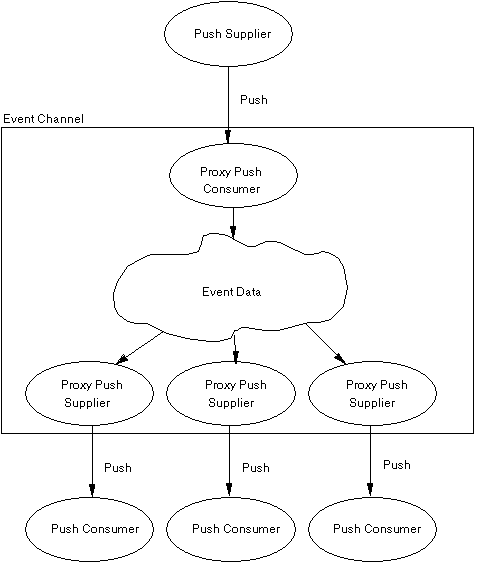
Here the push supplier interacts with the proxy push consumer in the event channel. Several push consumers are registered, so there is a proxy push supplier for each one. When the push supplier pushes an event, the proxy push consumer receives it. The event channel ensures that each proxy push supplier sees the event and supplies it to the attached push consumer. You can see how a single supplier can communicate to multiple consumers via the event channel.
This configuration is the easiest to understand because the interactions are straightforward. This configuration is useful in many applications that need to use the Event Service.
A push supplier, pull consumer configuration is illustrated in figure 4.
Figure 4. Push Supplier, Pull Consumers
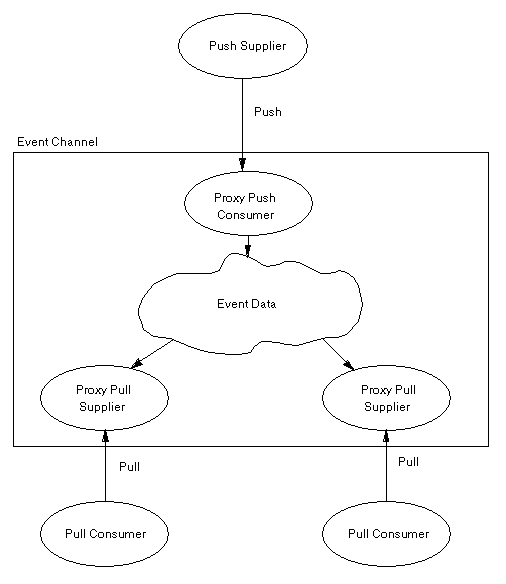
Here the push supplier interacts with the proxy push consumer in the event channel. Two pull consumers are registered, so there is a proxy pull supplier for each one. When the push supplier pushes an event, the proxy push consumer receives it. The event channel stores the event until it is requested (pulled) by the pull consumers. A pull consumer that requests an event when none is available must wait until one arrives.
A pull supplier, pull consumer configuration is illustrated in figure 5.
Figure 5. Pull Supplier, Pull Consumers
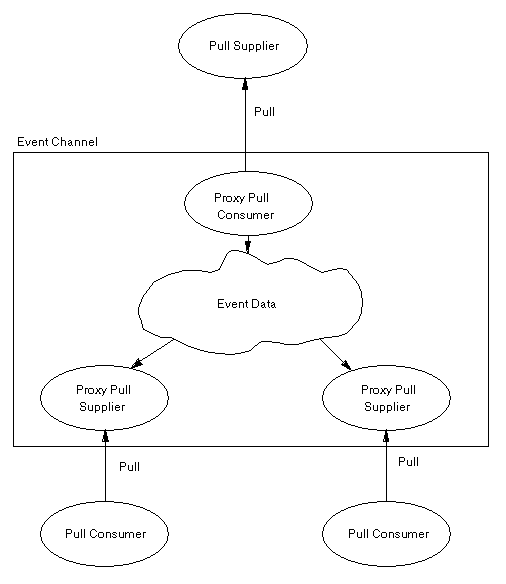
Here the pull consumers interact with the proxy pull suppliers in the event channel. Two pull consumers are registered, so there is a proxy pull supplier for each one. When the pull consumer requires an event, it issues a “pull” request to the proxy pull supplier. The event channel signals the pull suppliers that an event is required. Once the pull supplier supplies an event, it is forwarded to the proxy pull supplier, which satisfies the original pull request.
A pull supplier, push consumer configuration is illustrated in figure 6.
Figure 6. Pull Supplier, Push Consumers
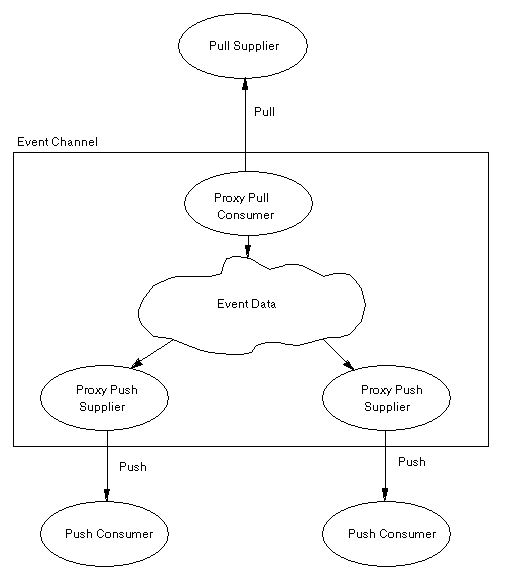
Here the pull supplier interacts with the proxy pull consumer in the event channel. Two push consumers are registered, so there is a proxy push supplier for each one. In this (possibly unusual) configuration, neither the pull supplier nor push consumer initiates an interaction. The event channel assumes the role of initiator. The proxy pull consumer periodically makes pull requests on the pull supplier. When an event is available, the proxy push suppliers push it to the push consumers.
There can be multiple suppliers and multiple consumers. In fact, any combination of push and pull suppliers and consumers is possible. Here is one configuration in which there is one of each kind of supplier and consumer:
Figure 7. Combinations of Suppliers and Consumers
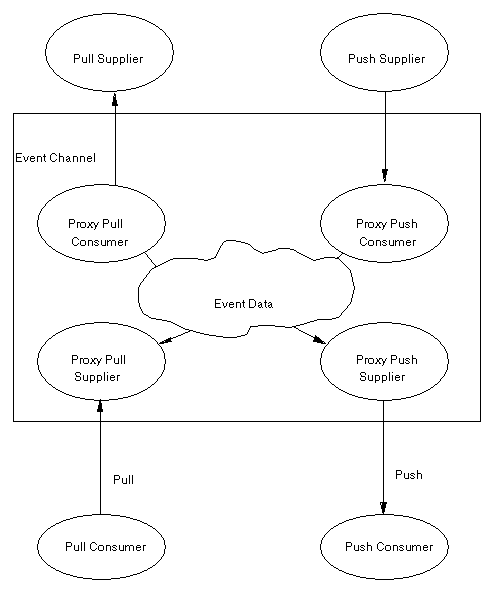
Here various types of interactions are possible. The push supplier can supply events whenever it has them. If it does supply, an event it is immediately pushed to the push consumer. The pull consumer can request an event when it needs one. If there is an event available, say, from the push supplier, the pull request is satisfied. Otherwise, a pull request is issued to the pull supplier. When the pull supplier does supply an event, it satisfies the pull request and is pushed to the push consumer as well.
When there are multiple pull suppliers and a pull request is issued, all of them receive the request. The first one to supply an event satisfies the original pull request. Additional events arriving from pull suppliers are stored until needed.
Event data sent by suppliers to the event channel and event data sent by the event channel to consumers is encapsulated in the any data type. Information stored in this data type can be as simple or as complex as necessary. As its name implies, the any data type can represent any type of data. See the Reference Guide topic CORBA::Any
for information on how to manipulate the any data type.
Suppliers and consumers must agree on the content of the information stored in the event data. The event channel does not interpret or alter the data. It simply passes the data between suppliers and consumers.
Before suppliers or consumers can use an event channel, it must be created. This section describes the NonStop DOM Event Channel factory facility used for creating event channels and illustrates its use. It also illustrates how to use the Name Service to store and retrieve event channel object references.
NonStop DOM provides a factory interface for creating an event channel. This interface, which appears in the file CosEventChannelAdmin.idl, is shown below:
interface EventChannelFactory
    {
       EventChannel create();
    };
|
To create an event channel application, invoke the create( ) method on the EventChannelFactory object. The newly created EventChannel object is returned from create( ).
Generally, the NonStop DOM Event Channel factory object is obtained from the Naming Service. As explained later, this factory object is stored in the Naming Service during NonStop DOM configuration. The factory object reference is retrieved from the Naming Service as illustrated below:
The first step is to retrieve the root-name context for the NonStop DOM Naming Service:
CORBA::Object_var CORBAObject;
CosNaming::NamingContext_var RootNameContext;

CORBAObject = orb->
    resolve_initial_references("NameService");
RootNameContext =
    CosNaming::NamingContext::_narrow(CORBAObject);
|
Next, the factory object is retrieved. The Naming Service resolve( ) method is used to retrieve the factory object reference. The factory object is stored in the EventService naming context. Its identifier is NSDOM ES and its kind is EventChannelFactory.
CosNaming::Name name; name.length(2); name[0].id = "EventService"; name[0].kind = ""; name[1].id = "NSDOM ES"; name[1].kind = "EventChannelFactory"; CORBAObject = RootNameContext->resolve(name); |
Finally, the factory object reference must be narrowed to an object of the correct type. This is
necessary because resolve( ) returns generic CORBA objects. The generic object must be cast to a factory object before it can be used.
CosEventChannelAdmin::EventChannelFactory_var Factory;
Factory = CosEventChannelAdmin::EventChannelFactory::
    _narrow( CORBAObject );
|
Once the Event Channel factory object is available, it is simple to create a new event channel:
CosEventChannelAdmin::EventChannel_var EventChannel; EventChannel = Factory->create(); |
An event channel used in common among several suppliers and consumers is created only once. The creator of the event channel then must make it known to other processes wishing to use it. The Naming Service is an ideal place for storing event channel object references. Here is an example of how that can be done:
name.length(1); name[0].id = "Application Event Channels"; name[0].kind = ""; CosNaming::NamingContext_var EventChannelsContext; CORBAObject = RootNameContext->resolve(name); EventChannelsContext = CosNaming::NamingContext::_narrow(CORBAObject); // Enter name for newly created event channel into // Naming Service so other users of the channel can find it. name.length(1); name[0].id = "commonEventChannel"; name[0].kind = "EventChannel"; EventChannelsContext->rebind(name, EventChannel); |
Here we assume there is an already existing naming context called Application Event Channels. We locate that context using the Naming Service resolve( ) method. Using this naming context, we bind the newly created event channel into the context. Its name is commonEventChannel and its kind is EventChannel. By using the rebind( ) method, we replace any existing event channel that was previously bound into the naming context with the same name.
Once the event channel object reference has been stored in the Naming Service, application programs can retrieve it and then use it. The technique for retrieving the object reference parallels that used to store it as shown below:
name.length(2);
name[0].id   = "Application Event Channels";
name[0].kind = "";
name[1].id   = "commonEventChannel";
name[1].kind = "EventChannel";

CORBAObject = RootNameContext->resolve(name);

// Narrow object reference to an Event Channel object
EventChannel = CosEventChannelAdmin::EventChannel::
    _narrow( CORBAObject );
|
After the event channel object reference has been retrieved, it is available for immediate use. Later sections show you how applications use the event channel.
The preceding sections have shown code for locating an event channel factory, creating an event channel, and locating a previously created event channel. In the context of an application environment, one or more processes may be responsible for performing these activities.
Here is one option for managing the creation and use of an event channel. In an application environment, a distinguished program creates the event channel as described above. It then registers it in the Naming Service under an agreed upon name. Other processes acting as suppliers and consumers subsequently query the Naming Service to obtain the event channel object.
Other possibilities for managing the creation and use of an event channel are possible. For example, a particular supplier object could be responsible for creating the event channel. Other consumer and supplier objects then use the created channel. Also, the event channel object reference need not be stored in the Naming Service. The creator of the event channel could, for example, use object_to_string to convert the object reference to external format and write it to a file. Other applications could read the file and use string_to_object to convert it to internal format for subsequent use.
Note that event channel objects are transient objects. Once created, they remain valid as long as the Event Service process hosting the object remains active. If that process is brought down or restarted, the event channel object is no longer valid. It must be created again.
A potential problem arises when an event channel object reference is stored in the Naming Service. If the event channel object becomes invalid, the Naming Service contains a “stale” object reference. Suppliers or consumers trying to use the “stale” object reference will fail. So application environments should be organized to avoid this situation. One possibility is to have the application environment startup sequence ensure that event channel object references are re-created. Another possibility is to have suppliers or consumers recognize a “stale” object reference and take steps to re-create it.
Although the examples given so far have depicted a single event channel, applications might require multiple event channels. Here are some possible uses for multiple event channels:
Multiple event channels operate in the same way as a single event channel. A single process may use more than one event channel. Depending on how the NonStop DOM Event Service is configured, a factory may create a new event channel in the same process as an existing event channel or it may create it in a new process.
Also, by configuring multiple Event Service server pools, multiple distinct Event Service factories are created. This provides additional flexibility in distributing the processing load for intensive use of the Event Service.
The event channel factory itself is typically created during the Event Service process startup. The default configuration of the Event Service causes the Event Channel factory object to be registered in the NonStop DOM Naming Service. It is registered with id NSDOM ES and kind EventChannelFactory. This factory object is bound into the EventService naming context in the NonStop DOM root-naming context. Unlike event channel objects, the event channel factory object is persistent. That is, it remains valid even if the Event Service is restarted.
The NonStop DOM Event Service can also be configured to create an event channel instead of an event channel factory at startup. This configuration might be appropriate in installations where only a single event channel is required. The advantage of this configuration is that event channel suppliers and consumers can use the event channel immediately without the overhead of creating it. If this configuration is specified, the event channel object is registered in the Naming Service with id NSDOM ES and kind EventChannel. This event channel object is bound into the EventService naming context in the NonStop DOM root-naming context.
Refer to the Administration Guide for additional information on how to alter the initial configuration of the Event Service.