

 The Application Environment
Application Configuration Management
Scaling Application Servers
Application Performance Tuning
Application Troubleshooting
What You Need to Know
The Application Environment
Application Configuration Management
Scaling Application Servers
Application Performance Tuning
Application Troubleshooting
What You Need to Know
Managing NonStop DOM applications, like managing the NonStop DOM system, consists of tasks such as configuring and monitoring the application processes, tuning system performance, and troubleshooting.
When you write NonStop DOM application servers, you have the option to configure them as NonStop TS/MP server pools. This is recommended because you then get the advantages of availability and scaleability that server pools offer.
Configuring your servers to run in server pools means that you must run your application servers under a PATHMON process that is specially configured for your servers. The easiest way to set up this PATHMON process is to copy and edit the script files that configure and start the NonStop DOM system.
This section provides an overview of the tasks needed to manage the application components that run in the NonStop DOM environment.
Figure 1 shows some types of application entities you might need to manage: stateless server pools, stateful server pools, single processes (clients and servers), and a distributed database.
Figure 1. NonStop DOM Application Components
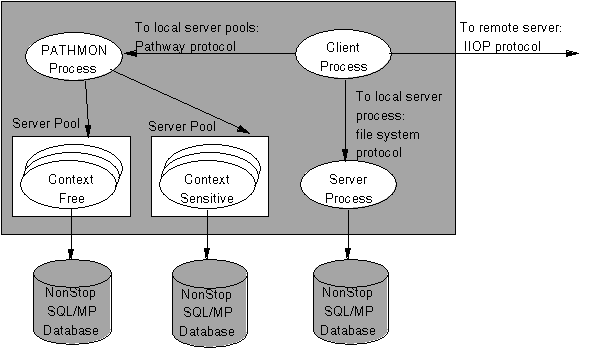
Note: Although the figure shows a NonStop SQL/MP database, your application can access other types of databases.
This topic describes the issues involved in configuration management, performance tuning, and troubleshooting for NonStop DOM application components.
NonStop DOM lets you use any of the following types of processes as application servers:
Whether a server runs as a server pool or as a single process depends on two configuration steps:
It is recommended that you use scripts to configure and run your application servers. These scripts are similar to the scripts that you use to start and run the NonStop DOM system. In the scripts, you configure your servers as "entites" in the same way the NonStop DOM system processes are configured.
Whether a server pool accepts stateless or stateful requests depends on whether its object classes require stateless or stateful processing.
In stateless processing, a request can go to any process in the server pool that hosts the object class. In stateful processing, the client that makes a request for an object obtains a link to a specific process; thereafter, requests to the same object, even from multiple clients, must go to the same process. Whether an object class is stateless or stateful depends on the object definition.
The same server pool can support both stateless and stateful processing, depending on the requirements of the objects that it hosts.
Note: For the purpose of this discussion, a server pool is stateless if it hosts only objects that require stateless processing; it is stateful if it hosts one or more objects that require stateful processing.
Stateless and stateful server pools are managed by NonStop Transaction Services/MP (NonStop TS/MP), which provides for scalability and load balancing by allowing multiple processes to work in parallel to perform the same task. NonStop TS/MP also provides for availability: its monitor process, called PATHMON, automatically restarts a process that fails. Because NonStop TS/MP provides all process management for the NonStop DOM system, you use NonStop TS/MP interfaces for either the line-oriented PATHCOM utility or the corresponding programmatic interface (based on the SPI) to configure and manage the NonStop DOM system processes. The same holds true for any NonStop DOM application process that you configure as NonStop TS/MP processes.
NonStop TS/MP does not typically manage single-server processes accessible directly through the file-system protocol or IIOP. You can use the process-management facilities of the Guardian environment or Open System Services (OSS) environment to start, monitor, and restart single processes as needed.
NonStop DOM supports scalability in its application servers with the following protocols:
A NonStop DOM application server may enable communications with a NonStop DOM or NonStop DOM client over the Tandem NonStop Kernel file-system protocol by adding the following configuration profile to the application server:
fs_server true
You can add this profile using the Configuration Tool, or you can configure the server application with this protocol when you initialize the server's PATHMON process.
Optionally, of the NonStop DOM application server profile may also contain the following settings:
tcp_server      true
use_comm_server true
When you add these two profiles to the application server, any CORBA-compliant client can communicate with the NonStop DOM application server. In this case, the Comm Server contained in the NonStop DOM system uses TCP/IP to communicate with the remote client, and the file-system protocol is used for the communications between the Comm Server and the application server.
To use the file-system protocol, a server program must be run named, which can be done in the script file that initializes the PATHCOM process under which the application server runs.
If you want a NonStop DOM client to communicate with a NonStop DOM or NonStop JORB application server via the file-system protocol, you must specify the following in the client profile:
fs_client true
You can add this to the client profile using the Configuration Tool.
Further, suppose the profile of a NonStop DOM application server specifies the following:
fs_server         true
tcp_server        true
use_comm_server   true
In this case, a remote client can use TCP/IP over IIOP to communicate with the NonStop DOM application server. Here, the client will communicate with the Comm Server over TCP/IP, and the Comm Server will relay the request to the application server using the file-system protocol.
In addition, if a NonStop DOM or NonStop JORB client makes a request of the same server, the client can use TCP/IP over IIOP if the profile of the client specifies following:
tcp_client true
A NonStop DOM application server may enable communications with a NonStop DOM or NonStop JORB client over the NonStop TS/MP protocol by adding the following profile to the application server:
tsmp_server     true
pathmon         <pathmon>
server_class    <server-class>
You can add this profile using the Configuration Tool, or you can configure the server application with this protocol when you initialize the server's PATHMON process.
Optionally, the profile of the NonStop DOM application server may also contain:
tcp_server      true
use_comm_server true
When you add these two profiles, any CORBA-compliant client can communicate with the NonStop DOM application server. In this case, the Comm Server contained in the NonStop DOM system uses TCP/IP to communicate with the remote client, and the NonStop TS/MP protocol is used for the communications between the Comm Server and the application server.
You must configure an application server as a NonStop TS/MP server for it to be able to communicate via the NonStop TS/MP protocol. This is most easily done by using a script to initialize the application server as a PATHCOM process. The NonStop DOM product provides serveral examples that contain such scripts.
If you want a NonStop DOM client to communicate with a NonStop DOM or NonStop JORB application server using the NonStop TS/MP protocol, you must specify the following in the client profile:
tsmp_client true
You can add this to the client profile using the Configuration Tool.
Futhurmore, suppose the profile of a NonStop DOM application server specifies the following:
tsmp_server       true
tcp_server        true
use_comm_server   true
In this case, a remote client can use TCP/IP over IIOP to communicate with the NonStop DOM application server. Here, the client will communicate with the Comm Server over TCP/IP, and the Comm Server will relay the request to the application server using the NonStop TS/MP protocol.
In addition, if a NonStop DOM or NonStop DOM client makes a request of the same server, the client can use TCP/IP over IIOP if the profile of the client specifies following:
tcp_client true
Application performance tuning for NonStop DOM application servers includes:
Server-pool management includes deciding how many server processes each pool requires and detecting when a performance problem results from a factor other than an insufficient number of server processes.
In general, performance tuning of stateless server pools is straightforward. Provided that you define the server pool in your PATHCOM configuration file to allow a sufficient number of server processes, NonStop TS/MP can automatically add and delete processes to accommodate changes in workload (just as a store varies the number of clerks on duty). You can use PATHCOM to study the utilization of processes in the pool and to help you decide if you need to increase the maximum number of configured processes.
Tuning stateful server pools is more complex. Because all requests to a specific object go to the same process for the duration of a request (even if other processes in the server pool are idle), NonStop TS/MP cannot completely balance the workload across the servers in the pool. Requests to different instances of the same object class can be balanced across processes in a server pool, but requests to the same instance, by one or more clients, must go to the same server. Because of this, some server processes might be overworked while others sit idle.
You can use PATHCOM to detect such a problem, but solving the problem often involves changing the application design. You can, for example, redefine object classes so more accept stateless requests. You might also be able to redesign you application so that the same transaction is accomplished by making smaller requests to the application object.
Troubleshooting a NonStop DOM application server usually involves program troubleshooting. However, in some cases a problem reflects incomplete or inconsistent configuration. Refer to the Programmer's Guide for information on troubleshooting your NonStop DOM system.
To manage NonStop DOM application components, you should be familiar with the following topics:
The Bibliography lists the Tandem manuals and other materials that provide the information you need to manage NonStop DOM application servers. You will also need information regarding any other components with which your NonStop DOM application interacts.