

 The Configuration Architecture
The NonStop DOM Script Files
Setting Up Environment Variables With env.sh
The configure Script File
The Configuration Database
The Initialization Script
NonStop DOM Framework Entities
Creating Entities
Deleting Existing Entities
The Default NonStop DOM Entities
Unconfiguring NonStop DOM
The Configuration Architecture
The NonStop DOM Script Files
Setting Up Environment Variables With env.sh
The configure Script File
The Configuration Database
The Initialization Script
NonStop DOM Framework Entities
Creating Entities
Deleting Existing Entities
The Default NonStop DOM Entities
Unconfiguring NonStop DOM
The Getting Started Guide contains topics that describe how to install NonStop DOM and how to quickly configure the NonStop DOM system for initial use.
This topic explains the details of the steps that you followed in the Quick Configuration topic. It also explains how to customizing the NonStop DOM system to fit your specific needs. The next topic, The Configuration Tool, describes how to maintain and customize your NonStop DOM system once it is up and running.
The topic The Architecture of NonStop DOM describes how the NonStop DOM system implments the CORBA-compliant ORB and CORBAservices that run on the Tandem NonStop Kernel.
The NonStop DOM client and server applications you write use the NonStop DOM system to communicate with remote CORBA clients. In light of this, configuring the NonStop DOM system consists mostly of configuring and maintaining the processes that make up the NonStop DOM system.
Note: Configuring your NonStop DOM application servers and NonStop DOM client applications is a separate issue than is configuring the NonStop DOM system. This topic discusses the specifics of configuring the NonStop DOM system. The topics Managing the Distributed Object Environment and Managing Application Processes discuss the details of configuring the C++ applications you write in NonStop DOM.
The configuration information for the NonStop DOM system is stored in the configuration database file. In addition to this file, various environment variable settings complete the NonStop DOM system configuration. Figure 1 shows the NonStop DOM system components and how they are integrated with the system configuration.
Figure 1. Configuring the NonStop DOM Framework
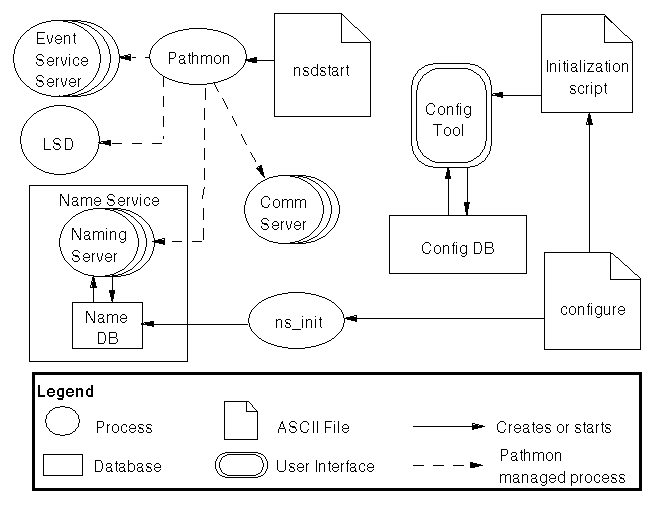
The NonStop DOM product includes a set of script files that you can use to create system profiles, set the system environment variables, create and initialize the configuration database, and start and stop the NonStop DOM framwwork processes. The product also includes a script that removes NonStop DOM from your system.
Six script files provided with NonStop DOM provide the functionality to:
The following script files set the environment variables for the NonStop DOM system and create the configuration and Naming Service databases:
Before you can start the processes that make up the NonStop DOM system, you must set various environment variables that the system uses. The script file env.sh sets the appropriate environment variables. Before you run this script, modify it so the variable settings reflect your specific system setup.
After setting the system variables, you can create and initialize the NonStop DOM databases using the configure script. Once this step is completed, you can start the processes in the NonStop DOM system.
The nsdstart script configures and starts the Pathway process that controls the NonStop DOM system. After it is started, the NonStop DOM system runs continuously, waiting to receive and distribute client requests. When a request arrives, the NonStop DOM system forwards the request to the appropriate NonStop DOM application server.
You can use the following scripts to stop the NonStop DOM system and remove the configuration and Naming Service databases from your system:
The nsdstop script shuts down the Pathway system running the NonStop DOM system. After stopping the NonStop DOM system, you must use the nsdstart script to restart the ORB.
The unconfigure script removes the NonStop DOM databases from your system. You can run this script only after terminating the NonStop DOM processes using the nsdstop script; the configuration and Naming Service databases cannot be open or be accessed by any system processes when you run unconfigure.
Caution: Running the unconfigure script permanently purges the NonStop DOM configuration and Naming Service databases from your system. Use this script only when you want to remove the existing NonStop DOM setup from your system.
Each NonStop DOM setup uses a unique set of environment variables. The file env.sh, found in the etc product subdirectory, sets up the NonStop DOM environment variables that are used by the other NonStop DOM scripts.
Mostly, env.sh sets up environment variables that refer to the disk volumes and subvolumes containing the different NonStop DOM components. Thus, you must customize the default env.sh script to reflect the directory locations of your individual NonStop DOM setup.
After customizing the env.sh script, you must source it each time you enter the environment from where you will start the NonStop DOM system. You can automate this process by sourcing the script each time you enter the Open System Services (OSS) shell on which the NonStop DOM system runs. To accomplish this, source the env.sh script in the .profile file of the OSS username who starts the shell that runs the system.
In addition to setting up volume and subvolume information, the env.sh file is used to set the installation character of the NonStop DOM system, which you can use to configure multiple installations of the framework on one system.
When you install NonStop DOM, the installation process creates the NonStop DOM subdirectories on the Guardian volume and subvolume that you specify during the installation process. These subdirectory locations are used in many of the NonStop DOM environment variables set in the env.sh file, as detailed in the Environment Variable Settings table.
The configure script does the following:
ns_init, which creates and initializes the Naming Service database
NS@name_service_settings entity
Caution: The configure script should only be run when you want to create a new set of NonStop DOM databases. Running this script a second time will re-create and initialize the databases specified in the script, overwriting any modifications you might have made to the database files.
When you run the configure script, it provides the following output:
> configure Bad database construct. "$SYSTEM.ZDOMRT20.NSDCFGDB" Cannot FILE_GETINFOBYNAME_ for file "$SYSTEM.ZDOMRT20.NSDCFGDB" cfgmgt initialization Completed LSD initialization Completed Initializing Naming Service. Creating POA for Naming Contexts. Initializing Naming Database. Creating Root Naming Context IOR. Root Naming Context IOR saved to config database. Naming Service initialization complete. |
The Bad database construct and Cannot FILE_GETINFOBYNAME_ are normal and expected response messages.
The configuration database contains settings used to configure the NonStop DOM system. It also coordinates configuration information for all NonStop DOM processes and provides a centralized information repository. You must create the configuration database before you start the NonStop DOM system.
Depending on the complexity of your NonStop DOM system setup, creating the configuration database can be a lengthy process. Because you must shut down the NonStop DOM system to re-create the configuration database, plan your system setup carefully and try to make the correct configuration settings the first time through.
The configure script, located in the bin subdirectory, calls on the Configuration Tool to create and initialize the NonStop DOM configuration database. Once loaded, the Configuration Tool interprets the commands in the initialization script to create the configuration database file and initialize the NonStop DOM entities. The configure script finishes by calling ns_init to initialize the Naming Service database and start the NonStop DOM Naming Service.
The following lines in the configure script initiate a session with the Configuration Tool, create an empty database, source the initialization script (in this case, the file custom.db), and exit the Configuration Tool session:
Line 1: cfgmgt <<\END
Line 2: dbcreate        ;# Create a database
Line 3: set myExit 0    ;# default exit code
Line 4: set myExit [catch {source $env(MY_ROOT)/etc/custom.db}]
Line 5: exit $myExit
Line 6: END
These commands are detailed below:
END tag on Line 6.
myExit flag to the value of 0.
If the system lists any errors as it interprets this script, edit the file to correct the errors then run the configure script again. If custom.db is interpreted without errors, you will not have to re-create the database if you later make updates. In this case, you can comment out the dbcreate command on Line 2 and rerun the script.
As is evident from these steps, the initial setup of the configuration database is done via commands in the initialization script file. In this case, the initialization script is titled custom.db, which is a modified version of the skeleton script file default.db.
To check the configuration database, run the Configuration Tool and issue entities command. This command generates a listing of all the entities in the database, which you can check to ensure that the database contains the correct set of entities. For complete details on the commands available with the Configuration Tool, refer to the Configuration Tool Commands subtopic.
You can create multiple configuration databases that make use of a single NonStop DOM system. In this case, a single NonStop DOM ORB would service different sets of applications servers, and each database would use a different set of environment variables and entities. To create such a setup, you need to create customized versions of the env.sh script, the initialization script, and the configure script before initializing any new databases.
NonStop DOM supplies an initialization script to create the initial configuration information in the configuration database. The template for the initialization script, default.db, resides in the etc subdirectory.
Note: If you create an initialization script with a name other than default.db, be sure to reference the new filename in the configure script on the line where the Configuration Tool sources the initialization file. To do this, open the configure script and change the filename default.db to your newly created file.
The file default.db is known as the skeleton script; it provides a template for the input that you must provide in the initialization script.
Modify the skeleton script so it contains the complete set of information for each configurable component contained in your NonStop DOM system. Once you have filled it out with the default configuration settings for all the components in both your NonStop DOM system and NonStop DOM servers, the script becomes a fleshed-out script.
When you run the configure script, it causes the Configuration Tool to read the fleshed-out script that initializes the configuration database. When you source the fleshed-out script, the Configuration Tool will check for errors and generate an error message if any are found.
The Configuration Tool performs only a lexical scan on the information in the fleshed-out script; no dynamic response checking exists. Thus, the Configuration Tool will not catch many types of errors. For example, an IP address may be configured into a fleshed-out script even though it might not actuality exist. Similarly, a process name might be duplicated, which would cause an error if that process were requested. A volume, subvolume, or system name may be configured into the script files, and the file location may not exist. File permissions may cause problems. These types of operational concerns must be addressed as needed, and proper modifications must be performed to properly configure your NonStop DOM system.
Comments in the script file begin with the hash character ("#"). The interpreter ignores everything on a line to the right of the hash character.
Line continuations begin with a trailing backslash ("\") as the last character of a line. The backslash causes the entire next line to be concatenated onto the previous line. Leading white space, if any, becomes part of the concatenated line.
The initialization script initializes the configuration database with NonStop DOM "entities."
In the script, an entity is defined as an ASCII tag that names a collection of key-value pairs. For simplification, think of an entity as the configuration for what will become a specific instance of an object. As the Configuration Tool interprets the initialization script, it stores each listed entity in the configuration database.
Each NonStop DOM configuration database contains zero or more entries. An entity provides an ASCII access string into a dictionary of information. Each entity accesses one or more key-value pairs. The entity keys are ASCII string values that are used to access the associated value. NonStop DOM does not restrict the length of entity names, key names, or value information, although you must enclose whitespace in double quotes (" ").
In the script, an entity description begins with the keyword entity, followed by the entity name, which always conforms to the following syntax:
profile@attribute
For example, the following snippets show specific entity names in the initialization script:
NSD@ORB
default@ORB
Each entity name must be unique within a NonStop DOM configuration database. If you attempt to define an existing entity name, the Configuration Tool will silently overwrite the existing values.
The entity keyword and entity name are followed by a list of key-value pairs, which configure the state of the entity. While minor variations should be expected, the following example highlights the basic format of an entity in the initialization script:
entity NS@ORB {
  use_comm_server    true
  tcp_server         true
  fs_server          true
  tsmp_server        true
  server_class       NS
}
|
You can create entities in the initialization script in two distinct ways:
entityaddkeyvalue keyword, which adds a single key-value pair
To use the braces, the open curly brace must be on the same line as the entity declaration and be separated by a space from the entity declaration. The closing brace encloses the key-value pairs associated with the entity. There may be an unlimited number of key-value pairs per entity.
Note: Keys or values may contain whitespace. However, if you use whitespace, you must place the entire key or value inside double-quotes to indicate a single lexical unit.
In the file, each key-value pair must occupy a single line, and there must be no comments between the curly braces enclosing the key-value pairs. Case sensitivity depends upon the actual use of the item; a key-value pair stores values exactly as entered. Though some items will logically discard case sensitivity (such as true, TRUE, and True), most do not. All values are stored exactly as entered.
If you follow an entity name with open and closed curly braces (an empty list of key-values), the entity definition is silently ignored. You can use an empty list as a placeholder for an entity to which you will later add key-value pairs. Interestingly, the ignoring behavior derives from the Enscribe database refusing to store empty records.
Note: A NonStop DOM configuration database normally contain keys with identical ASCII strings. However, duplicated keys should be located in different entities. If you duplicate a key name within a single entity, the second key-value pair will overwrite the value information from the previous definition.
Note that the Configuration Tool does not expand environmental variable strings that are placed in between curly braces, as described above. Therefore, you must use a different method to add entity information that contains expansion macros.
The following line in the initialization script uses the entityaddkeyvalue keyword to define an environment variable:
entityaddkeyvalue NS@ORB pathmon \$$env(MY_PREFIX)ndm
The code $env(MY_PREFIX) expands to the value of the external environment variable MY_PREFIX, replacing the text with the predefined value of the variable. Thus, for the entity NS@ORB, the key pathmon is given the value of "$" and the expanded environment variable MY_PREFIX concatenated with the string ndm.
The database stores text located between braces without change. Because the Configuration Tool does not expand strings enclosed within braces, you can easily insert fixed Tandem NonStop Kernel filenames, such as $0, into the database. This execution format allows programmatic flexibility; strings may be concatenated in the entityaddkeyvalue keyword, and the full value of the Tcl interpreter remains available. Refer to the references on the Tcl language for details.
In the initialization script, the line catch {entitydelete NS@ORB} removes the NS@ORB entity and its assiciated key-value pairs from the configuration database, if any exist. The deletion of an entity happens before the initialization of that entity with new values. This functionality permits running the script multiple times with assurance that the database will contain only the key-value pairs listed for each entity specified in the file.
catch {entitydelete NS@ORB}
entityaddkeyvalue NS@ORB pathmon \$$env(MY_PREFIX)ndm
entity NS@ORB {
  use_comm_server    true
  tcp_server         true
  fs_server          true
  tsmp_server        true
  server_class       NS
}
|
The catch keyword with associated matching braces catches a possible exception that would occur if NS@ORB were not present in the database. This permits the entity deletion to execute properly whether or not the entity exists.
The entitydelete command ensures that no old information remains in the database. If you completely remove an entity from the the initialization script, be sure to also remove the respective entity from the configuration database with a similar entitydelete command.
The default initialization script, default.db, initializes the following NonStop DOM entities:
This entity initializes the Naming service to the application-specific profile. The default setting for this entity is:
entityaddkeyvalue NS@ORB pathmon \$$env(MY_PREFIX)ndm
entity NS@ORB {
    use_comm_server  true
    tcp_server       true
    fs_server        true
    tsmp_server      true
    server_class     NS
}
|
This entity initialization accomplishes the following:
use_comm_server true enables the Comm Server server
tcp_server true means a TCP/IP server will be enabled
fs_server true means a file system server will be enabled
tsmp_server true enables the NonStop TS/MP server
server_class NS defines the server class for the Naming Service as NS.
This entry specifies the name of the Naming Service database. Notice the different format–the expansion of environment variables in the value portion demands this particular change. This would not be expanded if it were placed between curly braces.
catch {entitydelete NS@name_service_settings}
entityaddkeyvalue NS@name_service_settings DatabaseName \
    $env(MY_SUBVOL).NAMINGDB
entityaddkeyvalue NS@name_service_settings RootNamingContextIORFile \
    $env(MY_ROOT)/etc/root_nc.ior
|
A user-supplied environment variable, MY_SUBVOL, must be set to fully expand the NS@name_server_settings to a usable Tandem NonStop Kernel subvolume.
This entity provides a default profile for key-value pairs absent in the other entities.
entityaddkeyvalue default@ORB trace_file <STDOUT> entityaddkeyvalue default@ORB nsdom_ir $env(MY_ROOT)/etc/nsdom.ir entityaddkeyvalue default@ORB log_file $env(MY_COLLECTOR) |
The environment variables MY_ROOT and MY_COLLECTOR expand to the values of their respective environment variables.
The nsdom_ir value provides for a search path to the location of Interface Repository (IR) databases. Multiple IR databases may be used if separated with semicolons. The rightmost database listed receives updates for new additional IR entries. When you modify an IR, the search begins on the left, then proceeds until the correct IR is found. Any updated IR replaces the existing IR in the same database.
A typical arrangement will place the system IDL in the first (leftmost) IR database.
The log_file names the NonStop Kernel EMS logger and usually evaluates to $0. The environment variable MY_COLLECTOR provides the NonStop Kernel collector for logging errors and other information.
These declarations describe particular Comm Server port numbers and host names:
catch {entitydelete $env(MY_PREFIX)NCA@comm_server}
entityaddkeyvalue $env(MY_PREFIX)NCA@comm_server \
    host_name       $hostname
entityaddkeyvalue $env(MY_PREFIX)NCA@comm_server \
     port_number    $portnumber0
#
catch {entitydelete $env(MY_PREFIX)NCB@comm_server}
entityaddkeyvalue $env(MY_PREFIX)NCB@comm_server \
    host_name     $hostname
entityaddkeyvalue $env(MY_PREFIX)NCB@comm_server \
    port_number   $portnumber1
|
The initialization script must contain an entry for each NonStop DOM Comm Server. The environment variable MY_PREFIX prefixes the name of all Comm Server processes with the character that you specify in the env.sh script file. This prefix character lets you set up different NonStop DOM systems on a single system running the Tandem NonStop Kernel.
If the multiple Comm Servers exist, you must modify the nsdstart file to match the system setup.
The Location Service Daemon (LSD) obtains configuration information from this entity:
catch {entitydelete lsd1@ORB}
entityaddkeyvalue lsd1@ORB      host_name       $hostname
entityaddkeyvalue lsd1@ORB      port_number     $portnumber2
entity lsd1@ORB {
        tcp_server      true
}
|
Notice that you must supply a specific port number for the LSD; you cannot use a system-selected port number for the LSD.
The following setting are used by the Event Server:
catch {entitydelete event_service@ORB}
entityaddkeyvalue event_service@ORB     host_name       $hostname
entity event_service@ORB {
        tcp_server      true
        port_number     0
}
catch {entitydelete event_service@event_service_settings}
entity event_service@event_service_settings {
        EventServiceID  "NSDOM ES"
        EventServiceFactory true
}
entityaddkeyvalue event_service@event_service_settings \
    EventServiceIORFile $env(MY_ROOT)/etc/es.ior
|
The entities event_service@ORB and event_service@ event_service_settings configure the event services.
The EventServiceID identifies the event service object reference in the Naming Service. When the Even Service factory is set to TRUE, the Event Service creates a factory object and places its object reference in the Naming Service database. Setting the Event Service factory to FALSE causes the Event Service to create an event channel and place its object reference in the Naming Service database.
The optional EventServiceIORFile names a file to write the Event Service object reference. If the EventServiceIORFile file setting is absent, the Event Service will not create this file.
The initialization script entities tcp_client@ORB, tsmp_client@ORB, fs_server@ORB, fs_client@ORB, and default@trace are used by the ORB samples and illustrate various possible settings.
If you need to delete an existing NonStop DOM setup form your system, use the unconfigure script to delete the NonStop DOM Naming Service and configuration database files, NAMINGDB and NSDCFGDB, respectively.
Before you unconfigure your NonStop DOM system, ensure that you have previously run the nsdstop script and that the database files NAMINGDB and NSDCFGDB are not opened by any processes. These files are located in the Guardian subvolume of your NonStop DOM system. By default, this is $SYSTEM.ZDOMRT20.
To unconfigure the NonStop DOM system, issue the following command at your OSS shell:
> unconfigure
The following output will display:
> unconfigure **************************************************************** nsdstop must be run prior to running this script and NSDCFGDB and NAMINGDB database files cannot be opened. This will PERMANENTLY purge the NSDCFGDB and NAMINGDB databases. Do you want to proceed (y/n): y $SYSTEM.ZDOMRT20.NSDCFGDB PURGED. 1 FILE PURGED $SYSTEM.ZDOMRT20.NAMINGDB PURGED. 1 FILE PURGED |